
Snowflake’s 3-Layer Architecture
Day 1 was the pitch. Day 2 is the architecture. Almost every Domain 1 question, and many in Domains 3 and 4, reduces to one question: which of the three layers is doing the work? Get this clean today and the rest of the syllabus becomes pattern-matching.
Three terms the exam treats as common knowledge. Pin them down before the diagram lands.
| Term | Plain meaning |
|---|---|
| Decoupled | Two things that used to be welded together now move independently. In Snowflake, storage and compute are decoupled. You can grow one without touching the other. That one design choice unlocks half the platform’s features. |
| MPP (Massively Parallel Processing) | A single query is split into slices and run on many servers at the same time. Their partial results merge into the final answer. This is how a virtual warehouse processes a billion rows in seconds. |
| Metadata | Data about your data: table names, column types, row counts, micro-partition min/max values, ownership. Stored separately from the actual rows. This is the reason Snowflake can answer some queries without starting a warehouse. |
Today’s Concept
Micro-Concept 1: The Three Layers, in One Picture
Top to bottom. That is the entire architecture. The order matters, because every Snowflake doc, diagram, and exam question is framed this way.
| Layer | What it does | Where it sits in your mental model |
|---|---|---|
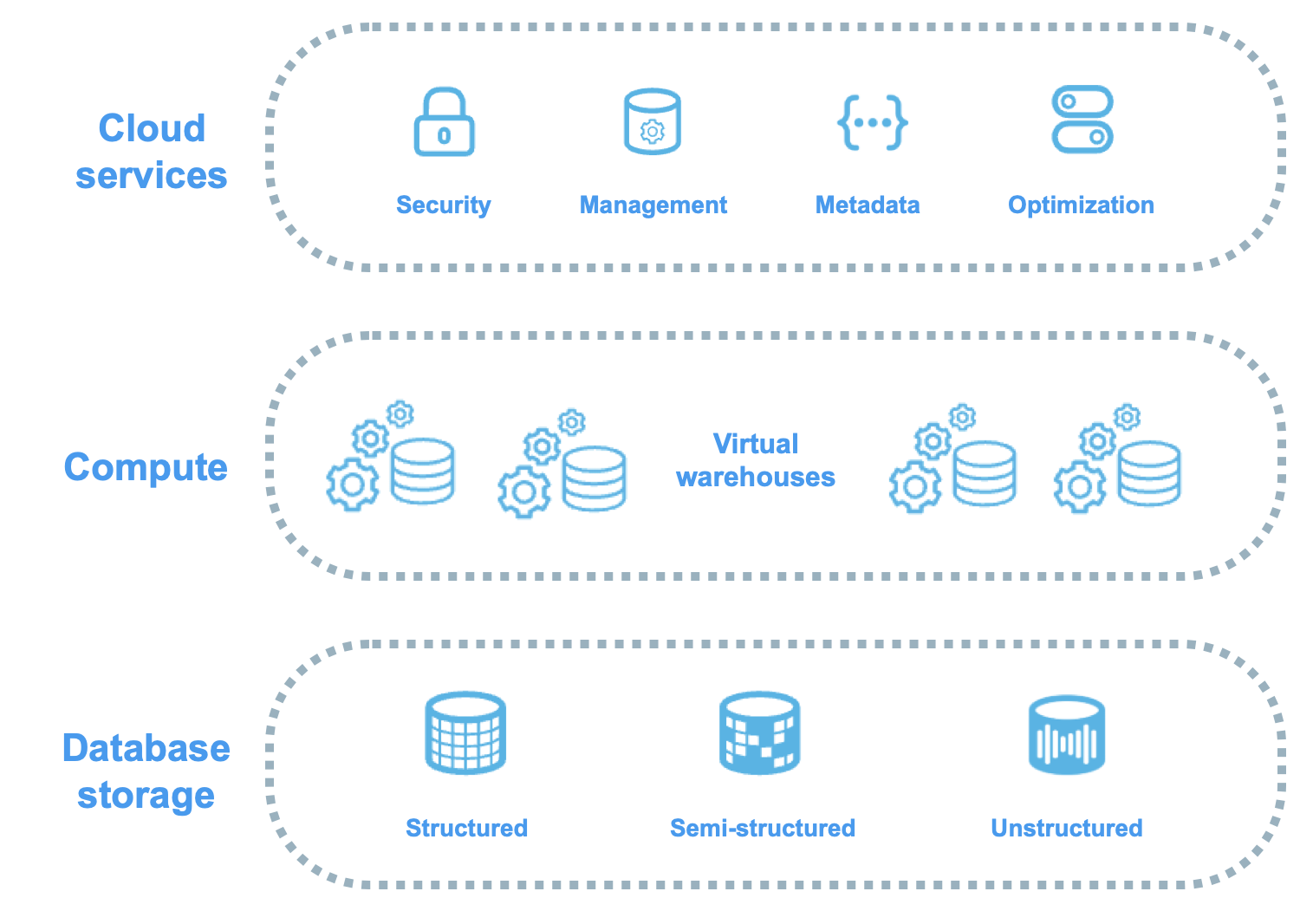
| 1. Cloud Services (top) | The brain. Authentication, RBAC, query parser, optimiser, transaction coordinator, metadata store, infrastructure manager. | Snowflake-managed. You never see the servers, never size them, never pay for them directly (within the 10% buffer). |
| 2. Compute (middle) | Virtual warehouses. MPP clusters that run your queries against data pulled from storage. | You create, size, suspend, resume, and pay for these. |
| 3. Database Storage (bottom) | Compressed, columnar, immutable micro-partitions in cloud object storage (S3 / Azure Blob / GCS). | You don’t manage files. Snowflake does. |
Every Snowflake architecture diagram has the same shape. One Cloud Services brain on top. Several warehouses side by side in the middle. One shared storage pool at the bottom. Your SQL lands at Cloud Services. Cloud Services routes it to a warehouse. The warehouse reads from storage. Results flow back through Cloud Services to your client: SQL → Cloud Services → warehouse → storage → results. Every production query follows that path. On the exam, every “which layer does X?” question asks you to identify the correct hop.
© Snowflake Inc.
Micro-Concept 2: Why This Architecture Matters
Older data warehouses forced a choice between two patterns. Snowflake borrowed the strengths of both.
→ Shared-disk: one storage pool, many compute nodes see it. You get a single source of truth, but the compute nodes contend with each other for I/O.
→ Shared-nothing: each compute node owns a slice of data. You get MPP performance, but rebalancing data when you add nodes is painful.
Snowflake’s answer is multi-cluster shared data. One logical copy of the data sits in cloud object storage. Many independent MPP compute clusters read from it. No node owns a partition. No warehouse blocks another.
What this buys you in real projects:
→ Spin up a large warehouse for a nightly ETL job and shut it down at dawn. The storage is unaffected.
→ Run a finance team’s BI warehouse and a data science team’s ML warehouse on the exact same tables, with zero contention between them. On a recent client migration we split workloads exactly this way: extracts on one warehouse, downstream transforms on another, no locks, no waits.
→ Add storage indefinitely without rethinking your compute footprint.
Micro-Concept 3: The Database Storage Layer (Bottom)
This is where your actual data lives. You will never see a file path, never pick a compression codec, never run a vacuum. When you load data, Snowflake reorganises it into a proprietary format. Four properties are worth knowing.
→ Columnar. Data is stored column by column inside each micro-partition. A query that touches 2 out of 50 columns reads only those 2. The other 48 stay on disk. This is why analytics queries that would crawl on a row-store run fast here.
→ Compressed. Snowflake picks a compression algorithm per column based on the data’s shape. You are billed on the post-compression size, not the raw size. That keeps storage cost down at scale.
→ Immutable micro-partitions. Small chunks roughly 50–500 MB uncompressed (around 16 MB compressed on disk), never modified in place. Every update writes new partitions and marks the old ones obsolete. That immutability is what Time Travel, Zero-Copy Cloning, and Fail-safe are built on. We cover micro-partitions in detail on Day 10.
→ Single source of truth. One logical copy, accessible by every warehouse in your account. No replication, no sync, no “which copy is current?”
You don’t manage any of this. No file paths, no partition sizing, no compression settings, no VACUUM, no ANALYZE. You write SQL. Snowflake handles the storage. That hands-off model is also a common trap. The exam will offer answers like “tune the micro-partition size” or “manually re-cluster the table.” You can’t do the first one at all. The second is a serverless feature you opt into, not something you hand-tune.
Micro-Concept 4: The Compute Layer (Middle)
This is the layer with the worst-named concept in the whole syllabus. “Virtual warehouse” in Snowflake means compute, not storage. Many candidates start out thinking a warehouse is where you store things, because that is what the word usually means. In Snowflake, a warehouse is a cluster of cloud servers that runs your queries. Nothing is stored in a warehouse. Suspend it and the data is untouched.
Each virtual warehouse:
→ Is independent. Multiple warehouses can hit the same data at the same time, with zero contention.
→ Has a size, X-Small through 6X-Large. The size determines how many servers are in the cluster and how many credits it burns per hour. Each step doubles the resources and doubles the credit rate.
→ Can be started, stopped, resized, or cloned in seconds. Billing is per-second with a 60-second minimum each time the warehouse resumes.
→ Uses MPP. Each query is split across all servers in the cluster, and the partial results are merged before being returned.
Warehouses are covered in detail on Day 8. For today, hold one mapping: warehouse = compute, never storage. If only one phrase from Week 1 stays with you, make it that one.
Micro-Concept 5: The Cloud Services Layer (Top): The Layer the Exam Cares About Most
This is the brain. A stateless collection of services Snowflake runs for you across multiple availability zones, globally coordinated through a distributed metadata store. You don’t provision it, see it, or size it. But it does a lot.
→ Authentication & access control. Login, MFA, SSO, role checks, RBAC enforcement.
→ Infrastructure management. Deciding where to run compute on the cloud provider, provisioning servers when you resume a warehouse.
→ Metadata management. Every table’s schema, every micro-partition’s min/max values, every row count, every clustering depth statistic.
→ Query parsing & optimisation. Turning your SQL into a pruned, distributed execution plan before any compute touches it.
→ Transaction management. ACID guarantees that hold even when multiple warehouses are writing.
→ Security. Encryption key management, network policies, audit logging.
The exam-critical idea: some queries are answered entirely by Cloud Services, with no warehouse needed. Snowflake doesn’t bill you for Cloud Services unless your daily Cloud Services consumption exceeds 10% of your daily warehouse credit usage. Most accounts never breach that limit. The “free up to 10%” fact is one of the most asked cost questions in the practice banks.
Micro-Concept 6: Which Queries Don’t Need a Warehouse?
If Cloud Services already has the answer in its metadata store, it hands it back directly. The classic examples are below.
| Query type | Needs a warehouse? | Why |
|---|---|---|
| SHOW DATABASES, SHOW TABLES, SHOW WAREHOUSES | ❌ No | Pure metadata. Answered from the Cloud Services catalogue. |
| DESCRIBE TABLE / DESCRIBE FUNCTION | ❌ No | Schema info. Pure metadata. |
| SELECT COUNT(*) FROM table | ❌ Often no | Row count is tracked in metadata. Usually served from the metadata cache without scanning data. |
| SELECT MIN(col), MAX(col) FROM table | ❌ Often no | Min/max per column are tracked at the micro-partition level. Metadata answers without reading rows. |
| SELECT col1, col2 FROM table WHERE … | ✅ Yes | Reading actual row values requires a warehouse to scan storage. |
| Any DML (INSERT, UPDATE, DELETE, MERGE) | ✅ Yes | Writes data. Needs compute. |
| CREATE / ALTER / DROP DDL | ❌ No | Metadata operations. Cloud Services handles them. CREATE TABLE doesn’t need a warehouse; INSERT INTO that same table does. |
Two important caveats:
→ COUNT(*) is “often”, not “always”, served from metadata. If there are open transactions, recent writes, or you are counting a view, Snowflake may fall back to compute. On the exam, the safe answer to “does COUNT(*) require a warehouse?” is “not necessarily.” Watch for absolutist phrasing in distractors.
→ SELECT 1, SELECT CURRENT_DATE(), SELECT CURRENT_USER(). No table involved at all. Cloud Services answers these instantly with no warehouse.
Cheat Sheet
| Concept | What to remember |
|---|---|
| Architecture style | Hybrid: shared-disk (one storage) + shared-nothing (MPP compute) = multi-cluster shared data |
| Three layers | Cloud Services (top, brain) → Compute (middle, warehouses) → Storage (bottom, micro-partitions) |
| Independent scaling | Each layer scales independently. Change compute without touching storage, and vice versa. |
| Storage format | Columnar, compressed, immutable micro-partitions (50–500 MB uncompressed; ~16 MB compressed) in cloud object storage |
| Source of truth | One copy of data, accessed by all warehouses in the account |
| Cloud Services duties | Auth, RBAC, optimiser, metadata, transactions, security, infra mgmt |
| Cloud Services billing | Free up to 10% of daily warehouse credits. Most accounts never pay for it. |
| No-warehouse queries | SHOW, DESCRIBE, DDL, often COUNT(*)/MIN/MAX. Answered from metadata. |
| Always-need-warehouse | Reading actual row values (SELECT cols WHERE …) and all DML (INSERT/UPDATE/DELETE/MERGE) |
“Which layer does X?” is the most repeated question pattern in Domain 1. Anchor each duty to a layer and the answer falls out. Auth, RBAC, optimiser, metadata, and transactions belong to Cloud Services. Running SQL against rows belongs to Compute. Holding the bytes belongs to Storage. Two common traps to watch for. (1) “You need a warehouse to run SHOW commands” is false: Cloud Services handles them. (2) “All COUNT(*) queries need a warehouse” is false: they are usually served from the metadata cache. A third trap appears in practice tests. Questions bundle DDL (CREATE TABLE) and DML (INSERT INTO) in the same multi-select and ask which need a warehouse. DDL doesn’t, DML does. If the question stem includes the words “metadata,” “authentication,” “optimiser,” or “query parsing,” the answer is almost always Cloud Services.
Hands-On Lab
Confirm your warehouse is suspended. Today’s lab proves that some queries don’t need a warehouse, so start by suspending it.
ALTER WAREHOUSE lab_xs SUSPEND;
SHOW WAREHOUSES LIKE 'LAB_XS';
-- Look at the "state" column — should say "SUSPENDED"SHOW WAREHOUSES just returned a result with no warehouse running. That is Cloud Services answering directly from its catalogue. You have proved Micro-Concept 6 in one statement.Run more metadata queries with no warehouse. All three should succeed and return instantly.
SHOW DATABASES;

DESCRIBE TABLE SNOWFLAKE_SAMPLE_DATA.TPCH_SF1.ORDERS;

SELECT CURRENT_DATE(), CURRENT_USER(), CURRENT_ROLE();The metadata-cache trick. Run COUNT(*) with no warehouse.
SELECT COUNT(*) FROM SNOWFLAKE_SAMPLE_DATA.TPCH_SF1.ORDERS;Force a query that DOES need a warehouse. Reading column values requires compute.
USE WAREHOUSE lab_xs;

SELECT O_ORDERSTATUS, COUNT(*) AS cnt
FROM SNOWFLAKE_SAMPLE_DATA.TPCH_SF1.ORDERS
GROUP BY O_ORDERSTATUS
ORDER BY cnt DESC;O_ORDERSTATUS column from storage and aggregate it. Check Query History again. The warehouse column is now populated. The side-by-side comparison with Step 3 is the cleanest demo of the layer boundary you will see.Min/max from metadata. Suspend again, then try this.
ALTER WAREHOUSE lab_xs SUSPEND;

SELECT
  MIN(O_ORDERDATE) AS earliest,
  MAX(O_ORDERDATE) AS latest
FROM SNOWFLAKE_SAMPLE_DATA.TPCH_SF1.ORDERS;Cleanup. Suspend so you don’t burn credits between sessions.
ALTER WAREHOUSE lab_xs SUSPEND;
-- Keep lab_xs alive — we use it again on Day 3.Snowflake Documentation
Official docs for today’s topics. The exam pulls phrasing straight from these.
External References
Visual deep-dives on Snowflake architecture. Useful if you prefer watching a diagram come together over reading the spec.
Practice Questions
Options:
A. Database Storage
B. Compute (Virtual Warehouses)
C. Cloud Services
D. Cloud Provider (AWS/Azure/GCP)
Why C: Cloud Services is the brain layer. Anything that decides who can run a query, what it gets turned into, or where the metadata lives belongs here. Authentication, RBAC, query parsing, optimisation, transactions, and the metadata store all sit in Cloud Services.
Why not A: Storage holds immutable micro-partitions in cloud object storage. It has no logic of its own: no parser, no optimiser, no permission check.
Why not B: Compute (warehouses) executes the query plan that Cloud Services hands it. A warehouse does not parse or optimise. By the time the query reaches the warehouse, the optimiser has already done its work.
Why not D: The cloud provider supplies the raw infrastructure (VMs, object storage). It plays no role in Snowflake’s three logical layers. This is the classic distractor. It targets the “Snowflake is a cloud provider” misconception from Day 1.
Options:
A. Pure shared-disk architecture
B. Pure shared-nothing architecture
C. Hybrid: shared-disk (one storage) + shared-nothing (MPP compute)
D. Single-node monolithic architecture
Why C: Snowflake combines both patterns. One shared storage layer acts as the single source of truth. Multiple independent MPP compute clusters run on top of it, with no shared state between them. The official phrase, and the one the exam uses, is multi-cluster shared data.
Why not A or B: Pure forms each have well-known weaknesses. Shared-disk hits I/O contention as nodes scale. Shared-nothing is painful to rebalance when you add nodes. Snowflake’s hybrid borrows the upside of each without inheriting the downsides. That is the whole pitch.
Why not D: Snowflake is highly distributed at every layer. “Monolithic” or “single-node” in any answer choice is a giveaway distractor. Strike it on sight.
Options:
A. Storage and compute are decoupled, so a separate dedicated ETL warehouse can run on the same data with no contention
B. Snowflake automatically replicates the data into a second copy for the ETL job
C. The ETL job must run on the same warehouse to keep data consistent
D. Snowflake locks the table during ETL, queueing BI queries until ETL completes
Why A: This is the headline benefit of multi-cluster shared data. Spin up a dedicated warehouse for ETL. The BI warehouse keeps reading the same single copy of the data with zero contention. Running ingest pipelines on one warehouse next to BI traffic on another is the standard pattern for workload isolation in production.
Why not B: No copy is ever made. Both warehouses read the same storage layer. If you see “automatically replicates” in an architecture answer, it’s almost always a distractor.
Why not C: Sharing one warehouse would cause contention. That is exactly the problem we are trying to solve. Workload isolation is the textbook reason multiple warehouses exist.
Why not D: Snowflake doesn’t lock tables on read the way traditional RDBMSs do. Readers and writers don’t block each other. That is a property of the immutable micro-partition design.
Options:
A. SHOW TABLES
B. SELECT col1, col2 FROM orders WHERE region = ‘EMEA’
C. DESCRIBE TABLE customers
D. UPDATE orders SET status = ‘shipped’ WHERE order_id = 123
E. SELECT MIN(order_date), MAX(order_date) FROM orders
Why A: SHOW commands are pure metadata. Cloud Services answers them straight from its catalogue. Lab Step 1 proved this with the warehouse explicitly suspended.
Why C: DESCRIBE returns schema information. Also pure metadata, also no compute.
Why E: Min and max per column are tracked in micro-partition metadata. Cloud Services serves the answer from the cache without scanning rows. Lab Step 5 demonstrated this.
Why not B: Reading actual column values with a WHERE filter requires a warehouse to scan storage and apply the predicate. Metadata can’t answer “what are the values in this column?”
Why not D: All DML (INSERT / UPDATE / DELETE / MERGE) needs compute. There is no shortcut here. Writes always go through a warehouse.
Options:
A. Data is stored in row-based format for fast OLTP queries
B. Data is stored in immutable, compressed, columnar micro-partitions
C. Each virtual warehouse maintains its own private copy of the data
D. Storage scales independently of compute
E. Customers manage micro-partition sizing manually
Why B: Snowflake’s storage format is columnar, compressed, and built from immutable micro-partitions (50–500 MB uncompressed, ~16 MB compressed). Updates write new partitions and mark old ones obsolete, rather than modifying in place. That immutability is what makes Time Travel and Zero-Copy Cloning possible.
Why D: Storage and compute scale separately. That is the whole architectural pitch. You can store petabytes without resizing your warehouses, and you can resize warehouses without touching a single byte of storage.
Why not A: Snowflake is columnar, optimised for analytics. Pure row-based storage is for OLTP systems, a different design point. (Hybrid Tables, which the syllabus covers later, are the row-store exception, but they are not what this question is about.)
Why not C: One single source of truth. All warehouses read the same storage layer. Warehouses have a local SSD cache, but it is a cache, not a private copy. Suspend the warehouse and the cache is gone.
Why not E: Micro-partitioning is fully automatic. Customers never size or place partitions. Clustering keys are an opt-in tuning lever for very large tables (covered properly on Day 39), but even then Snowflake manages the actual partition mechanics.
Today you learned: Snowflake has three layers. Cloud Services is the brain (auth, RBAC, optimiser, metadata, transactions). Compute is the virtual warehouses running MPP query execution. Database Storage is immutable, compressed, columnar micro-partitions. The layers scale independently. Many queries (SHOW, DESCRIBE, DDL, and often COUNT(*) and MIN/MAX) are answered entirely by Cloud Services with no warehouse needed. Cloud Services billing is free up to 10% of your daily warehouse credits, which most accounts never breach.
Key takeaway: If a question asks “which layer does X?”, match X to one of three buckets. Metadata, auth, optimisation, and transactions go to Cloud Services. Running SQL against rows goes to Compute. Holding the bytes goes to Storage. This single mapping shows up dozens of ways on the exam.
Tomorrow (Day 3): Snowflake editions. Standard, Enterprise, Business Critical, VPS. The exam constantly asks “what’s the MINIMUM edition for feature X?” Tomorrow’s post builds the boundary map: which features unlock at which tier, and the three traps Snowflake plants in those questions.
