
Snowflake Interfaces
Snowflake offers several client interfaces: Snowsight, Snowflake CLI, SnowSQL, the VS Code extension, and drivers for application code. The exam tests which command works from which interface, and the PUT/GET rule catches almost everyone the first time.
Some of these terms get used loosely. Here are the distinctions:
| Term | Plain meaning |
|---|---|
| Worksheet | A SQL editor tab inside Snowsight. Like a Google Doc for queries: saved, shareable, with results panes underneath. |
| CLI (Command-Line Interface) | A program you run from your terminal. Snowflake has two: the new Snowflake CLI (command: snow) and the older SnowSQL (command: snowsql). |
| Driver / Connector | A library that lets your application code (Python, Java, Node, .NET, ODBC, JDBC) talk to Snowflake. Same Snowflake on the other end. Different ways to connect. |
| PUT / GET | SQL commands that move files between your local machine and a Snowflake stage. They look like SQL but need access to your local file system, so they only run from a client tool. |
Today’s Concept
Micro-Concept 1: Snowsight (The Web UI)
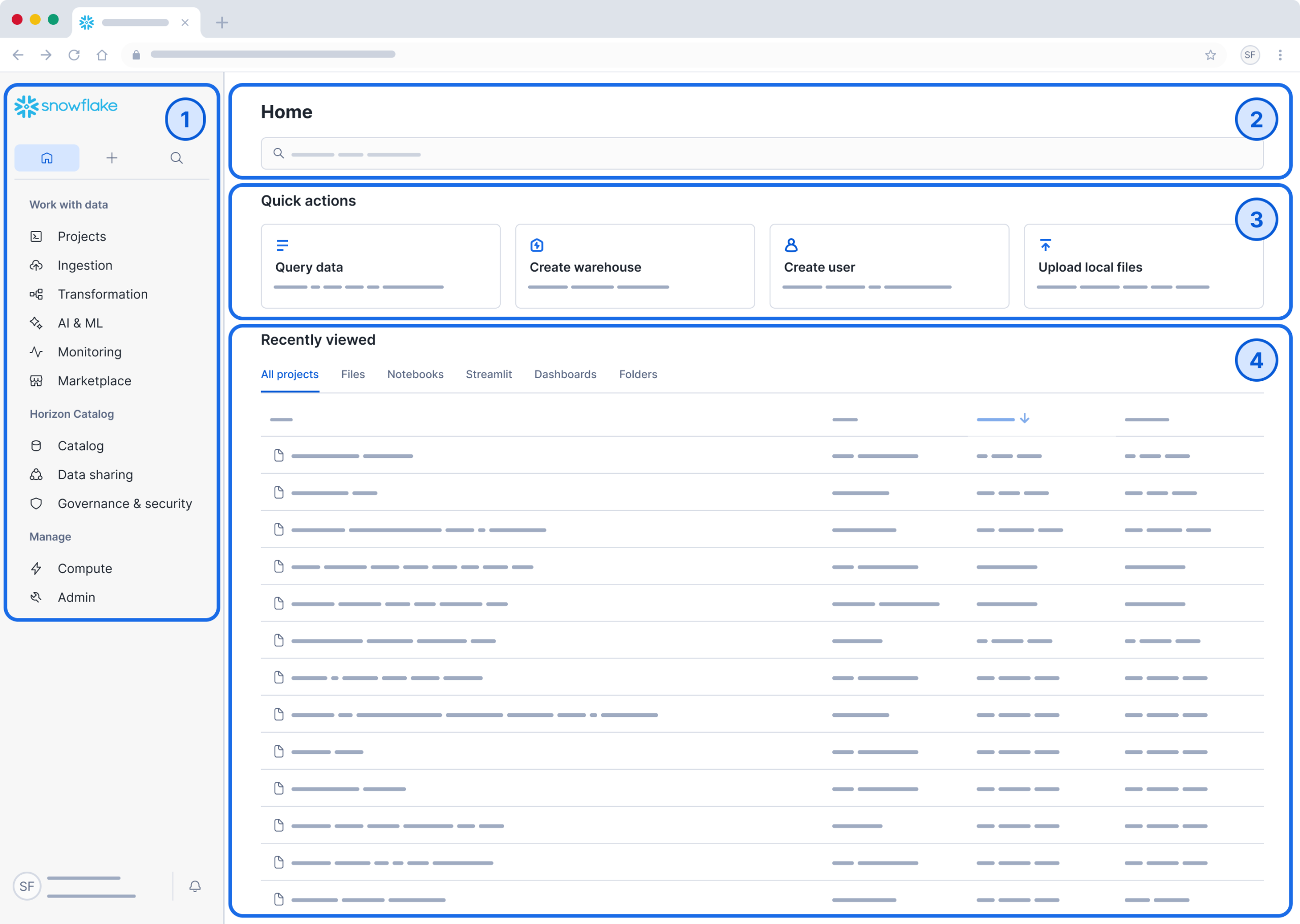
Snowsight is the modern web-based interface that ships with every Snowflake account. You don’t install anything; just open a browser and log in. It covers most everyday work:
→ Worksheets: write and run SQL, with autocomplete, syntax highlighting, and result panes.
→ Query History: every query you’ve run, with timing, status, and a clickable Query Profile (we use this heavily in Week 6).
→ Dashboards: chart query results into shareable dashboards.
→ Notebooks: Python and SQL notebooks running inside Snowflake (Day 15).
→ Admin: warehouses, users, roles, resource monitors, network policies, billing.
→ Marketplace: browse and acquire data products.
For most analyst and developer work, Snowsight is enough. It has one notable limitation: no local file access. Anything that needs to read or write files on your laptop has to come from a CLI client.
© Snowflake Inc.
Micro-Concept 2: The Two CLI Clients (Snowflake CLI vs SnowSQL)
Snowflake ships two command-line clients today. Both work, they coexist, and they target slightly different needs.
Snowflake CLI (snow) | SnowSQL (snowsql) | |
|---|---|---|
| Released | 2024. Newer, actively developed | Long-standing, classic SQL CLI |
| Scope | SQL plus Snowpark, Streamlit, Native Apps, dbt, Snowpark Container Services | Pure SQL execution from the terminal |
| Status | All new features land here | Still supported (1.4.x line through 2027). No new features |
| Snowflake’s recommendation | Use this for new projects | Migrate when you can |
| PUT / GET file commands | ✅ Supported | ✅ Supported |
Exam-safe phrasing: SnowSQL is not deprecated; both clients work today. All new feature investment goes into Snowflake CLI.
Micro-Concept 3: The PUT / GET Trap
This is the single most-tested item from Domain 1.2. Two SQL-looking commands cannot run from Snowsight worksheets:
→ PUT file://<local_path> @<stage>: uploads a file from your machine to a stage.
→ GET @<stage>/<file> file://<local_dir>: downloads a file from a stage to your machine.
Why can’t they run from a browser? The browser sandbox can’t read or write your local file system. PUT and GET need a client that can: Snowflake CLI, SnowSQL, or a driver with the right APIs.
| Command | Snowsight | Snowflake CLI / SnowSQL | Why |
|---|---|---|---|
| SELECT, INSERT, COPY INTO, MERGE | ✅ | ✅ | Server-side SQL. Runs on Snowflake |
| SHOW, DESCRIBE, GRANT, REVOKE | ✅ | ✅ | Server-side SQL |
| LIST @stage, REMOVE @stage | ✅ | ✅ | Server-side. Operates on the stage, no local files |
| PUT file://… @stage | ❌ | ✅ | Reads from your local file system |
| GET @stage file://… | ❌ | ✅ | Writes to your local file system |
Heads-up: Snowsight does offer browser-based file upload via the UI for small ad-hoc uploads. But the SQL commands PUT and GET themselves still cannot run in a worksheet. The exam tests the SQL command behaviour, not the UI affordance.
Micro-Concept 4: VS Code Extension
The Snowflake Extension for Visual Studio Code lets developers stay in their IDE while working with Snowflake. It supports:
→ Browsing databases, schemas, tables, and views in a sidebar.
→ Running SQL files against your account.
→ Editing and running Notebooks.
→ Writing and deploying Snowpark Python, Streamlit, and Native App code.
It is optional and free. For the exam, remember this: VS Code with the Snowflake extension is a supported way to author and run SQL, notebooks, and Snowpark code.
Micro-Concept 5: Drivers & Connectors
For application code, Snowflake provides:
→ Snowflake Connector for Python: most popular for data work.
→ Snowpark APIs (Python, Java, Scala): code runs inside Snowflake (Day 15).
→ JDBC driver: for any JVM language.
→ ODBC driver: for tools like Excel, Tableau, Power BI.
→ Node.js driver, .NET driver, Go driver, PHP driver.
You don’t need to memorize each driver’s quirks for SnowPro Core. Know they all exist, and that picking the right one is a customer choice, not a Snowflake-side restriction.
Micro-Concept 6: How to Choose for the Exam
The exam phrases questions like “Which interface is best for X?” Match X to one of these answers:
| Need | Best fit |
|---|---|
| Ad-hoc SQL, dashboards, admin clicks, Query Profile | Snowsight |
| Uploading/downloading files (PUT / GET) | Snowflake CLI or SnowSQL |
| Scripted batch jobs, scheduled SQL automation | Snowflake CLI or SnowSQL |
| Deploying Snowpark, Streamlit, Native Apps from local code | Snowflake CLI |
| Browsing data and authoring SQL inside an IDE | VS Code extension |
| Embedding Snowflake calls in app code | Driver/connector for that language |
| Plugging Snowflake into Tableau / Power BI / Excel | ODBC / JDBC driver |
Cheat Sheet
| Concept | What to remember |
|---|---|
| Snowsight | Web UI for worksheets, dashboards, query profile, admin. No local file access. |
Snowflake CLI (snow) | Newer CLI. SQL + Snowpark + Streamlit + Native Apps. All new features land here. |
SnowSQL (snowsql) | Older CLI. Still supported. Pure SQL. Recommended to migrate, not deprecated. |
| PUT / GET | Need a client with local file access. Never runs from Snowsight worksheets |
| VS Code extension | Optional IDE plug-in for browsing, SQL, Snowpark, notebooks |
| Drivers | Python connector, JDBC, ODBC, Node.js, .NET, Go, PHP |
| Query Profile location | Snowsight → Activity → Query History → click query → Query Profile tab |
| Snowflake-managed | Snowsight runs on Snowflake’s infrastructure (you don’t host it) |
The PUT/GET question is almost guaranteed to appear. If a multi-select asks “which can run from a Snowsight worksheet?”, PUT and GET are never in the answer. They need a CLI client (or a driver) to access your local file system. The other classic trap is the claim that SnowSQL is deprecated. That is false. Snowflake recommends moving to the new CLI for new development, but SnowSQL is still supported and shipping bug-fix releases. “Recommended to transition” ≠ “deprecated.”
Hands-On Lab
Create a named worksheet. In Snowsight, top-left menu, click + Worksheet. Name it Day4Lab. It is a standard SQL tab.
Run a query and find its profile. Paste and run:
USE WAREHOUSE lab_xs;

SELECT O_ORDERSTATUS, COUNT(*) AS cnt
FROM SNOWFLAKE_SAMPLE_DATA.TPCH_SF1.ORDERS
GROUP BY O_ORDERSTATUS
ORDER BY cnt DESC;
Go to Activity → Query History. Find the query, click the SQL row, then open the Query Profile tab. You’ll see the execution plan as a node graph. We dissect Query Profile properly on Day 36.
Build a one-tile dashboard. Click the chart icon next to your results pane. Pick a bar chart on O_ORDERSTATUS / cnt. Save the chart as a tile in a new dashboard called Day4Dashboard. This is Snowsight’s no-code BI for ad-hoc visualizations.
Try PUT in Snowsight (and watch it fail). Paste and run:
PUT file:///tmp/anything.csv @~;(Optional, ~5 min) Install Snowflake CLI locally. If you want to try PUT and GET, install snow from docs.snowflake.com. It works on macOS, Linux, and Windows. Then:
# Add a connection
snow connection add

# Test it
snow connection test

# Run any SQL
snow sql -q "SELECT CURRENT_VERSION()"snow connection test succeeds, you have an interface that can run PUT and GET. We use it for real on Day 29 (stages) and Day 30 (loading).Cleanup. No DB cleanup needed today. Suspend the warehouse if it’s still running.
ALTER WAREHOUSE lab_xs SUSPEND;Snowflake Documentation
External References
Driver and IDE resources.
Practice Questions
Options:
A. COPY INTO mytable FROM @mystage
B. PUT file:///tmp/data.csv @mystage
C. LIST @mystage
D. GET @mystage/data.csv file:///tmp
E. REMOVE @mystage/old_file.csv
Why B and D: PUT and GET move files between your local file system and a Snowflake stage. The browser can’t access local files, so they must run from a CLI (Snowflake CLI or SnowSQL).
Why not A, C, E: COPY INTO, LIST, and REMOVE are server-side SQL. They operate inside Snowflake and run from any interface, including Snowsight.
Options:
A. Snowsight Worksheets
B. Snowflake CLI or SnowSQL
C. Snowsight Dashboards
D. The Snowflake mobile app
Why B: CLI clients (Snowflake CLI or SnowSQL) are headless and scriptable. That fits cron, CI/CD, or any unattended automation. Tasks can also be scheduled inside Snowflake using TASK objects (Day 33), but the CLI is the right “interface” answer here.
Why not A or C: Snowsight is interactive and requires clicks. There is no headless mode for browser-driven worksheets.
Why not D: Snowflake doesn’t ship a mobile app for query execution.
Options:
A. Worksheets → click the result row → “Show Plan”
B. Activity → Query History → click the query → Query Profile
C. Admin → Warehouses → click the warehouse → Active Queries
D. Marketplace → My Queries
Why B: Query Profile lives under Activity → Query History → drill into a specific query. This is the standard path the exam expects.
Why not A, C, D: None of these are valid Snowsight paths to Query Profile.
Options:
A. SnowSQL has been deprecated and is no longer supported
B. Snowflake CLI (snow) and SnowSQL coexist; new features land in the Snowflake CLI
C. Snowflake CLI replaces Snowsight as the primary user interface
D. Both CLIs require Business Critical edition to run
Why B: Snowflake recommends transitioning to the new Snowflake CLI for new development, but SnowSQL is still actively supported (1.4.x line through 2027). Both work; new feature investment is in snow.
Why not A: SnowSQL is not deprecated. “Recommended to transition” is different from “deprecated.”
Why not C: Snowsight is still the primary web UI. The CLI is for scriptable, file-system, and dev workloads.
Why not D: CLIs work on every edition. There is no edition gate.
Options:
A. Browse databases, schemas, and tables in a sidebar
B. Replace the need for a Snowflake account
C. Author and run SQL files and Notebooks against a Snowflake account
D. Provide local on-disk Snowflake compute
E. Manage Snowflake billing and resource monitors visually
Why A: The extension provides an object explorer in the IDE sidebar.
Why C: You can author and execute SQL and Notebooks against a connected Snowflake account from VS Code.
Why not B or D: The extension is a client. It doesn’t run a local Snowflake or replace the cloud account.
Why not E: Billing and resource monitors are managed in Snowsight, not in the VS Code extension.
Today you learned: Snowsight is the web UI for everyday SQL, dashboards, profiles, and admin. Snowflake CLI (snow) is the modern command-line client where new features land. SnowSQL is the older CLI, still supported, recommended to migrate. The VS Code extension brings Snowflake into your IDE. PUT and GET (the file transfer commands) only run from a CLI or driver, never from Snowsight worksheets.
Key takeaway: Match the interface to the need. Local files → CLI. Visual exploration / dashboards / Query Profile → Snowsight. Scripted automation → CLI. Embedded in app code → driver/connector.
Tomorrow (Day 5): Object hierarchy and the 12 database objects. We map Account → Database → Schema → object. We name the 12 things that count as “database objects” on the C03 exam. We also cover the difference between INFORMATION_SCHEMA (real-time, no dropped objects) and ACCOUNT_USAGE (45 min – 3 hr latency, 365-day history including dropped objects). Both questions show up on every test.
